
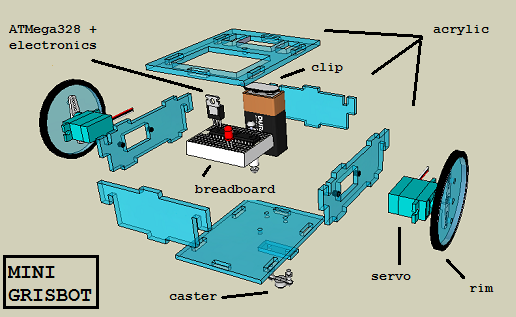
How much do the materials of the robot cost?
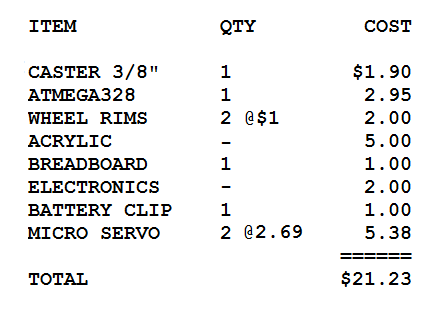
Costs not included: laser cutting service, switch, labor for servo conversion and pre-soldering (if any), hardware (ie bolts and nuts).
How much do the materials of the robot cost?
Costs not included: laser cutting service, switch, labor for servo conversion and pre-soldering (if any), hardware (ie bolts and nuts).
The robot ‘brain’ (aka ATMega328) needs to know how long the servos must rotate in order to properly execute moves and turns. Hence there must be a servo timing calibration mode, and a way to initiate the mode. I’ve toyed with using a pushbutton or a magnet/reed switch in the past, but then the obvious occurred to me: why not just have a calibration mode control code?
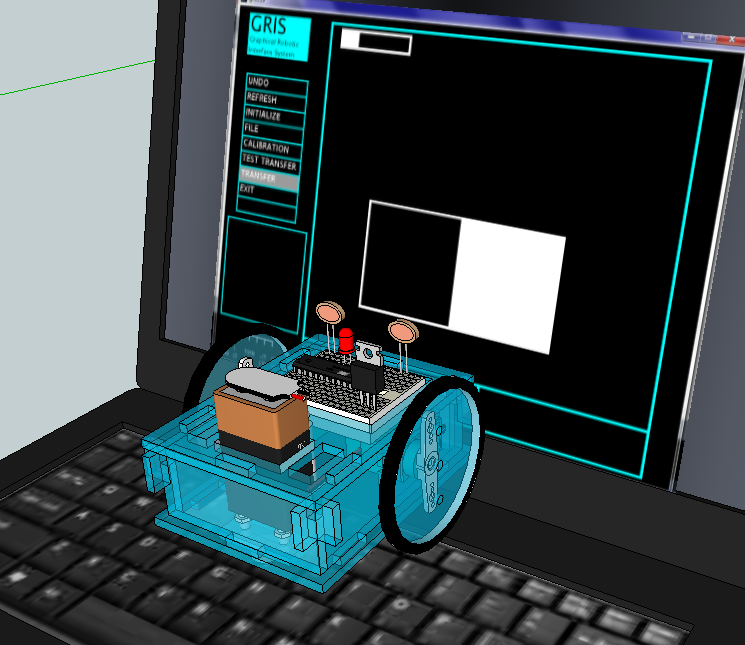
Instead of sending path segment angle and distance information, the GRIS program will simply flash a single control code. I’m leaning toward ‘124,’ since 125 and 126 are the start and stop control codes.
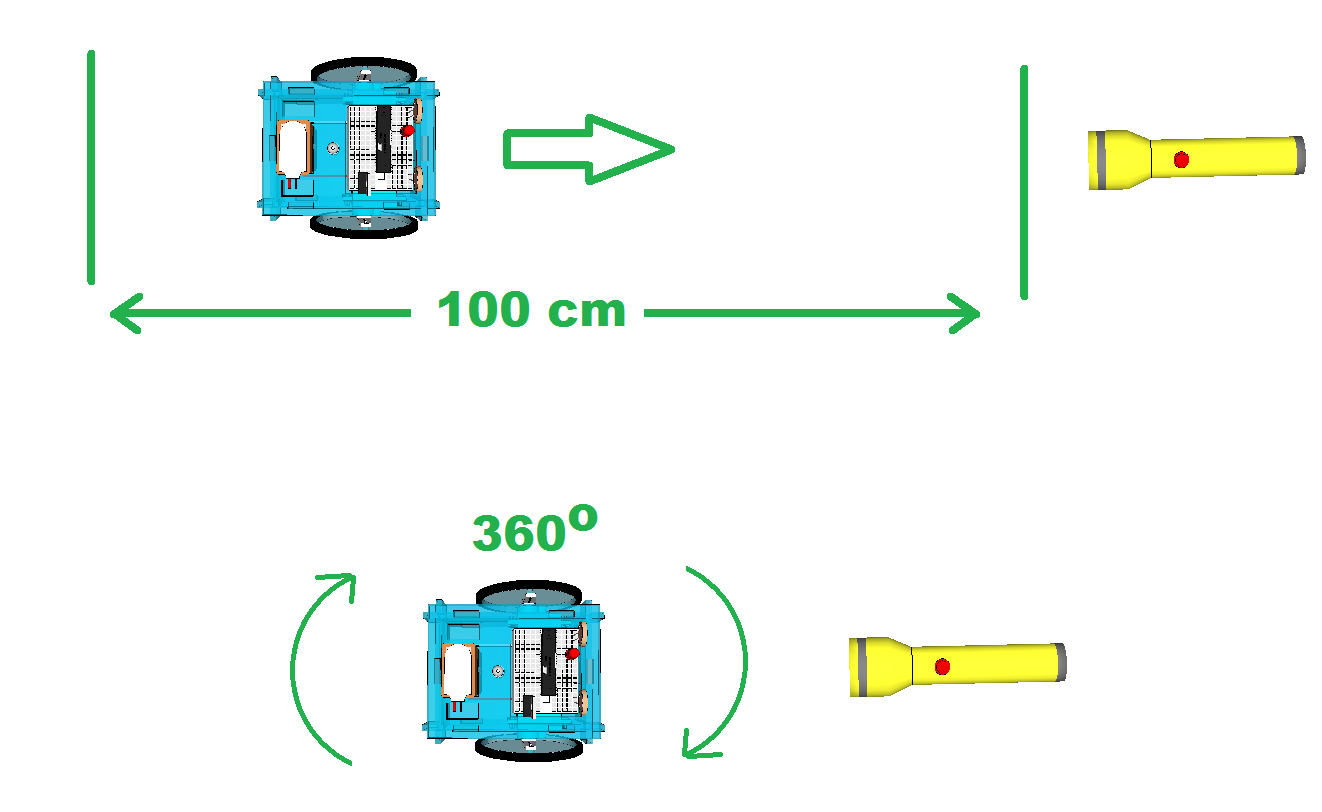
In servo timing calibration mode, the robot will wait five seconds and then start traveling in a straight line. It is up to the user to measure out a distance of one meter and to shine a flashlight on the photocells when the robot reaches that distance. At which point the robot stops and stores the calibration information in EEPROM.
After another five seconds, the robot will start turning. After it has turned full circle (ie, 360 degrees), the user shines the flashlight again, and the robot stops and again stores calibration information in EEPROM.
Now the robot knows how long it takes for the servos to travel one meter and turn 360 degrees, and from that it is easy to calculate how long it will take to travel one centimeter and turn one degree. The next time the robot is turned on in regular mode, it will reference EEPROM and retrieve the stored calibration values, and multiply the path distance and turn data by the unit amounts to calculate how long the servos must rotate for each command.
No magnets or reed switches required, but I will have to revise the main GRIS program. This will keep me busy while waiting for ordered parts to arrive.
A company called Golden Spike is planning to offer manned missions to the Moon by the end of this decade. Here is their graphic:

Source SPACE.com: All about our solar system, outer space and exploration
Here is a video essay that I did on the subject almost two years ago:

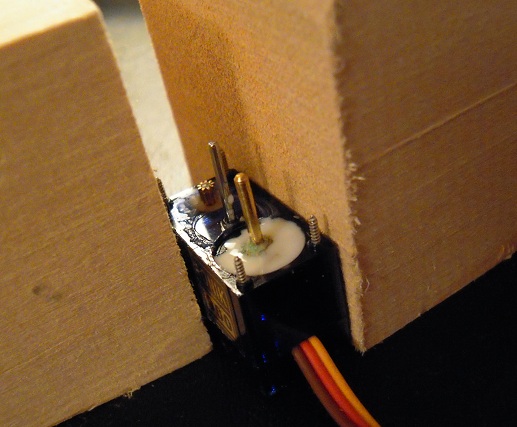
No, it didn’t crash. I had to disassemble mini grisbot in order to perform surgery on the right servo, whose centering had drifted so much that the wheel could not turn forward.
To keep the potentiometer shaft from twisting (thereby drifting) again, I fill the potentiometer well with glue. Online instructions for servo conversion recommend hot glue for fixing the position of the pot shaft, but surface tension causes the glue to bead and that interferes with the turning of the bottom gear. By applying cold glue with a toothpick, I can spread the glue flat.
This is what I did on the other servo, and I haven’t had any problems with that one . . . yet.
Preliminary test of my robot.
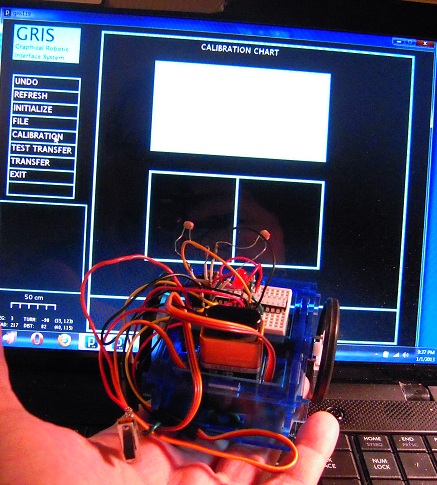
I have completed screen-to-photocell calibration and control code transfer. Mini grisbot passes both with flying (or at least hopping and skipping) colors. The remaining test phase is to calibrate the servo timings to execute the path as shown on the screen.
I just might finish this today.
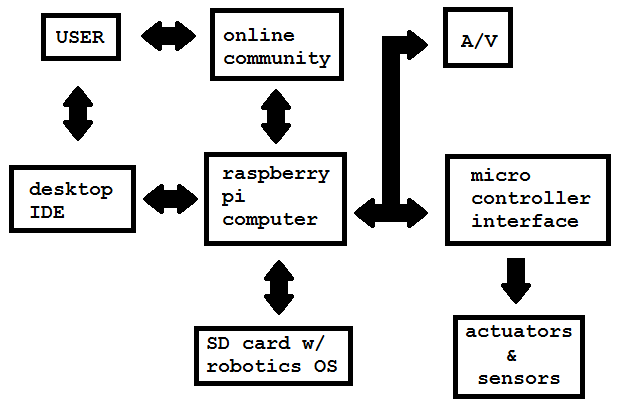
My interest in the Raspberry Pi concerns its use as robot brains. I made the above chart to help me better understand where the Raspberry Robotics development process is heading.
I’ll need an IDE on my laptop/desktop which can transfer files from the online community and my computer(s) to the Raspberry Pi without the need of having to find a spare monitor and keyboard for the Pi. A pre-loaded SD card with a robotics-oriented operation system would make configuration a lot easier.
The Arduino/ATMega could serve as an interface between the Pi and the sensors and actuators, taking advantage of the great pre-existing library of interface ‘sketches’ that already exist for the Arduino. Audio/Visual will connect directly with the Pi, and the IDE will need to pipe in the vision and sound for development and troubleshooting.
From what I’ve read about it so far, the Raspberry Pi is destined for great things robot-wise. It appears to have enough onboard processing power to perform visual pattern recognition and object manipulation, which could mean that soon we’ll be seeing Raspberry Robots setting the table, taking out the garbage, shoveling the snow, performing brain surgery, and driving trucks. Well, maybe not driving trucks.
Even the simplest tasks will require lines and lines of programming, requiring a vibrant online community for me to copy and paste stuff from.
Happy New Year, which for me will looks like it will be the Year of the Raspberry Robot.
Obviously, there’s going to be course error buildup. I don’t think encoders would help that much. I’m thinking of navigation beacons, like so:
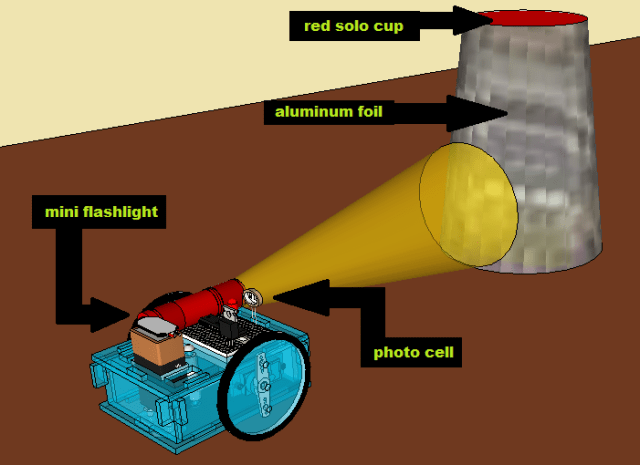
(Maybe infrared? Hmm . . . . )
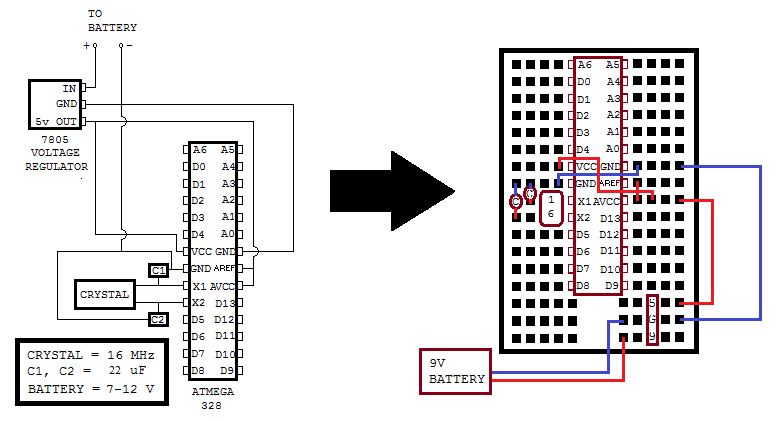
This is related to the previous entry and shows the circuit diagram and breadboard layout for an ATMega removed from the Arduino prototyping platform after being programmed. The wiring layout on the right isn’t mandatory, of course, but it does conserve on the voltage regulator’s 5V and Ground row holes.
(Jan 15, 2013 REVISION: Changed capacitors from 10 uF to 22 uF.)
Why take the ATMega328 chip off its happy home on the Arduino to sit naked on a breadboard? Because Arduinos cost $22 while the ATMega328 with Arduino bootloader runs about $1-2 plus a dollar for the support components and a couple dollars for the breadboard. So if you’re planning on making a lot of microcontroller projects and don’t need to connect to wi-fi or USB and stuff, the ‘Naked ATMega’ is the way to go in order to stay within budget.
Permit me to show you how incredibly easy it is to move the ATMega chip off the Arduino prototyping platform once you’ve programmed it, and then bring it back to the Arduino board for reprogramming as needed:
NOTES.
0. The breadboard layout for an ATMega328 with support components and wiring is derived from the Mintduino Instructable. I skipped some resistors and capacitors on the voltage regulator, but it seems to work.
1. Take it slow and easy, be gentle. As mentioned in a previous entry, I crimped pin D9 by not being careful.
2. Probably should have unplugged the Arduino from the computer before removing the chip.
3. I don’t know what the yellow handled tool is called. Let’s go with ‘prying tool.’
4. The device used to push the chip into the breadboard is known as a ‘pen.’ (No overthinking here, folks!)
5. A pin identification sticker for the ATMega is very helpful. Here are some.
 Engineer Zero