Minor DIY surgery on a TV set

My nephew bought a TV at Goodwill for just fifteen dollars the other day, so that he and his friend can play XBox games side by side with their own screens in my apartment. I’m such a pushover that I let him do this, but anyways, the little prong on the yellow video input plug broke.

Why is this a big deal? The prong broke inside the jack, so we had to unscrew the TV housing in order to get to the rear of the jack and push the prong out. This was not cut and dried and both my nephew and I have come to appreciate how much of modern consumer electronics is designed so that you can’t easily get at the innards.

This is the TV:

A cable with working prongs is inserted into the jacks beneath the screen in this ‘post-op’ photo.

And this is the broken prong:

You’ll notice the solder where we tried to attach the prong back to the plug. The plug cable is cut because we also tried to attach a conventional video input plug to the damaged XBox cable, but that didn’t work either.

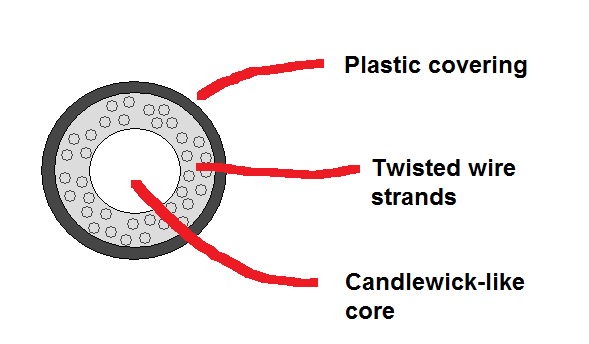
This is how a cross-section of the cable looks:

Now that I think about it some more, I wonder if there is a connector that will join severed pieces of cable together. If so, we may yet be in business. Otherwise, my neph will have to buy a new cable.

This item on ebay looks like it’s what we want. And at the time I’m reading this, the Buy It Now selling price is $10.98 with free shipping. That’s not so bad. But I’m sure my nephew would rather not spend any money at all.

Sorry I don’t have any pictures of the TV housing opened. After we screwed it back together, I said to my nephew, “You know, I should have taken a picture.” And he agreed. But I’m still new to this concept of DIY photoblogging.

Anyhow the amazing thing is not that we took the TV apart, but that we put it back together and it still works. Since we got the broken prong out of the jack, we did actually fix the TV. It’s the Microsoft custom cable that is the problem child. Why am I not surprised?

Posted in Uncategorized | Tagged , , , | Leave a comment

How to provide pump power at Fukushima

Normally, I wouldn’t think myself qualified to offer insight on how to cool a reactor plant in meltdown, but then I read this in the “New York Times:

Christopher D. Wilson, a reactor operator and later a manager at Exelon’s Oyster Creek plant, near Toms River, N.J., said, “normally you would just re-establish electricity supply, from the on-site diesel generator or a portable one.” Portable generators have been brought into Fukushima, he said.

Fukushima was designed by General Electric, as Oyster Creek was around the same time, and the two plants are similar. The problem, he said, was that the hookup is done through electric switching equipment that is in a basement room flooded by the tsunami, he said. “Even though you have generators on site, you have to get the water out of the basement,” he said.

— “Radioactive Releases in Japan Could Last Months, Experts Say” (New York Times, March 13, 2011)

Yes, it never occurred to nuclear power safety engineers that an earthquake might cause a tsunami, and a tsunami might flood a basement.

Normally, I wouldn’t offer the following obvious suggestion, but maybe thinking about the obvious is something that is lacking here. Anyhow, here is a diagram which I hope clarifies the situation and offers a simple solution.

They want to attach the portable power generator at Point 1, which they can’t do because it’s underwater. Well, how about cutting the power lines at Point 2, and connecting the portable power generator there? Then you don’t have to bother with pumping out the basement or repairing the switching equipment.

Just cut the cables, clamp on the jumpers and go.

Any electronics hobbyist, to say nothing of an electrician or an electrical engineer, would know how to do this. And again, it seems so obvious that I wonder why it isn’t being done. But then, I would have thought that the earthquake/tsunami/basement-flooding progression would have been obvious too, and no one saw the potential problem for all these years.

Posted in Uncategorized | Tagged , , | Leave a comment

Neighborhood Power Plants: An Alternative to Catastrophe and Collapse

Today was a gloomy day here in the Seattle region. The sky was overcast and it was nonstop raining. I happened to be driving through downtown around noontime when I saw a sign which gave the solar flux: .23 kw.

A square meter of standard photovoltaic panel generates only about 150 volts of power, max, and a kilowatt-hour per day of energy. At .23 flux, we’re talking about 35 watts per square meter max, and .23 kilowatt hour per day per square meter.

Well, I just measured my two bedroom apartment. It’s about 70 square meters. It’s in a two story building, so I have to share roof space with the people below me, but still that’s 35 square meters.

All right, then that’s 35 square meters of roof space times .23 kilowatt hours per day per square meter, which equals 8 kilowatt hours per day. That’s about half my energy usage in winter, but with better insulation, energy conservation, and above all, a smaller and more practical refrigerator, I might just be able to get to that.

Actually, I wouldn’t be allowed to put solar panels on my rooftop. The apartment complex management wouldn’t allow it. But what if my community were to build a solar array so that it didn’t have to tap off a state or national power grid?

The city of Bellevue, Washington, has a population of 122,000. Let’s say we have 100 square meters of photovoltaic paneling per person. That would require 12,000,000 square meters total, or 12 square kilometers. This would be only 14% of the land area of the city — which is surrounded by more rural areas, by the way.

For the entire United States, 300 million people would require 30 billion square meters for residential usage, or 30,000 square kilometers. This is only .3% of the surface area of the US. Total power usage for industry as well would require about one percent of US land area — about what we have paved over. And all those median strips are presently going to waste.

Back to my community of Bellevue. If we were to build enough solar panels on rooftops, on freeway median strips, and on sidewalk awnings, then we wouldn’t have to tap into state- and national- power grids.

What about snow days of complete overcast? Well, batteries do allow for a reserve of several days, but then there is also the possibility of generating auxiliary power with fossil fuels.

You see, I’m a practical shade of green. If it gets really dark and cold, then fine, let’s use fossil fuels. But the rest of the time, let’s use solar power. Okay, you might reply, but even if we only use it for a few days a year, don’t we still have to build a big giant fossil fuel plant and support all the infrastructure as well?

I thought so too, then I priced portable power generators. Not the small home ones, but the big ones. I would send you to the page for a 22,500 watt beauty, but it’s not working from yesterday. Hmm. So let’s go with this 10 kw generator at Amazon. It costs a thousand dollars and provides enough power for twenty house holds. That’s fifty dollars per household.

Imagine one of these on every street. You know, where the state-wide electric company already has a house-sized switching station. Anyhow, it would sit in a shed until needed. And it would only be needed a few days every year.

With neighborhood solar arrays and portable power generators, electrical power in Japan would have been restored in no time. I know from personal experience that there’s nothing more agonizing than waiting days for power to be restored at the whim of a large regional power authority. And in my case, that was just from a wind storm.

But what about the infrastructure cost of all this? Solar panels are nothing more than silicon wafers, just like computer chips, and so they are likely to follow the same decline in price as computer chips, and eventually cost pennies per square meter. I see that happening in the next ten years.

But what about now? What would it cost now, say, for the nation of Japan to abandon its national nuclear power initiative and embrace instead a paradigm of local solar arrays and neighborhood power generators?

Well, I haven’t done the calculations, but I suspect it would be less than the cost of replacing Japan.

Posted in Uncategorized | Tagged , , , , , | Leave a comment

Can robots stop a meltdown?

Forbes Magazine, “Risk of Nuclear Catastrophe Escalates in Japan – ‘Worse than Chernobyl'”:

“The electrical grid is down. The emergency diesel generators have been damaged. The multi-reactor Fukushima atomic power plant is now relying on battery power, which will only last around eight hours. The danger is, the very thermally hot reactor cores at the plant must be continuously cooled for 24 to 48 hours. Without any electricity, the pumps won’t be able to pump water through the hot reactor cores to cool them. Once electricity is lost, the irradiated nuclear fuel could begin to melt down. If the containment systems fail, a catastrophic radioactivity release to the environment could occur.”

Being a proponent of teleoperated robots, my response was to think of how teleoperated robots could help in environments such as fire and high radioactivity where humans cannot function.

So I stripped down my sketchup design for a teleoperated robot:

Robots like this could drive portable generator trailers to the reactor plant site. They could connect the generators to the reactor power system. They could get the cooling pumps running and operate them.

Japan must have a thousand university robotics students who could assemble a team of such robots in a matter of hours from the spare parts of class projects.

The Japanese are smart. So either they’re doing this, or something more effective, and we’re just not getting the full details in the US media.

It bothers me that the US response to this crisis is to send an aircraft carrier. We sent one to Haiti after their earthquake, and they still haven’t recovered. It’s an American compulsion these days to think of every problem in terms of military solutions.

However, I am confident that Japan’s leaders do think about engineering as a way to solve problems, and so Japan will survive this crisis.

Posted in Uncategorized | Tagged , , , , | Leave a comment

Just to replace a laptop screen cable

So my nephew’s T*sh*b* laptop screen was blinking when he tilted it, and now it doesn’t work at all. Most likely reasons, according to internet forum gurus, are the screen cable or the inverter. Okay, we’ll just open up the screen enclosure and replace the faulty parts. Easy peasy.

Not so fast.

First you have to remove the battery. Then some screws. A lot of screws.

Then you can pry off (good luck with this) a plastic strip at the top edge of the keyboard. Then you can remove the keyboard.

At this point, you’re wondering, “Weren’t you trying to get to something having to do with the screen?” Well, we’re getting there.

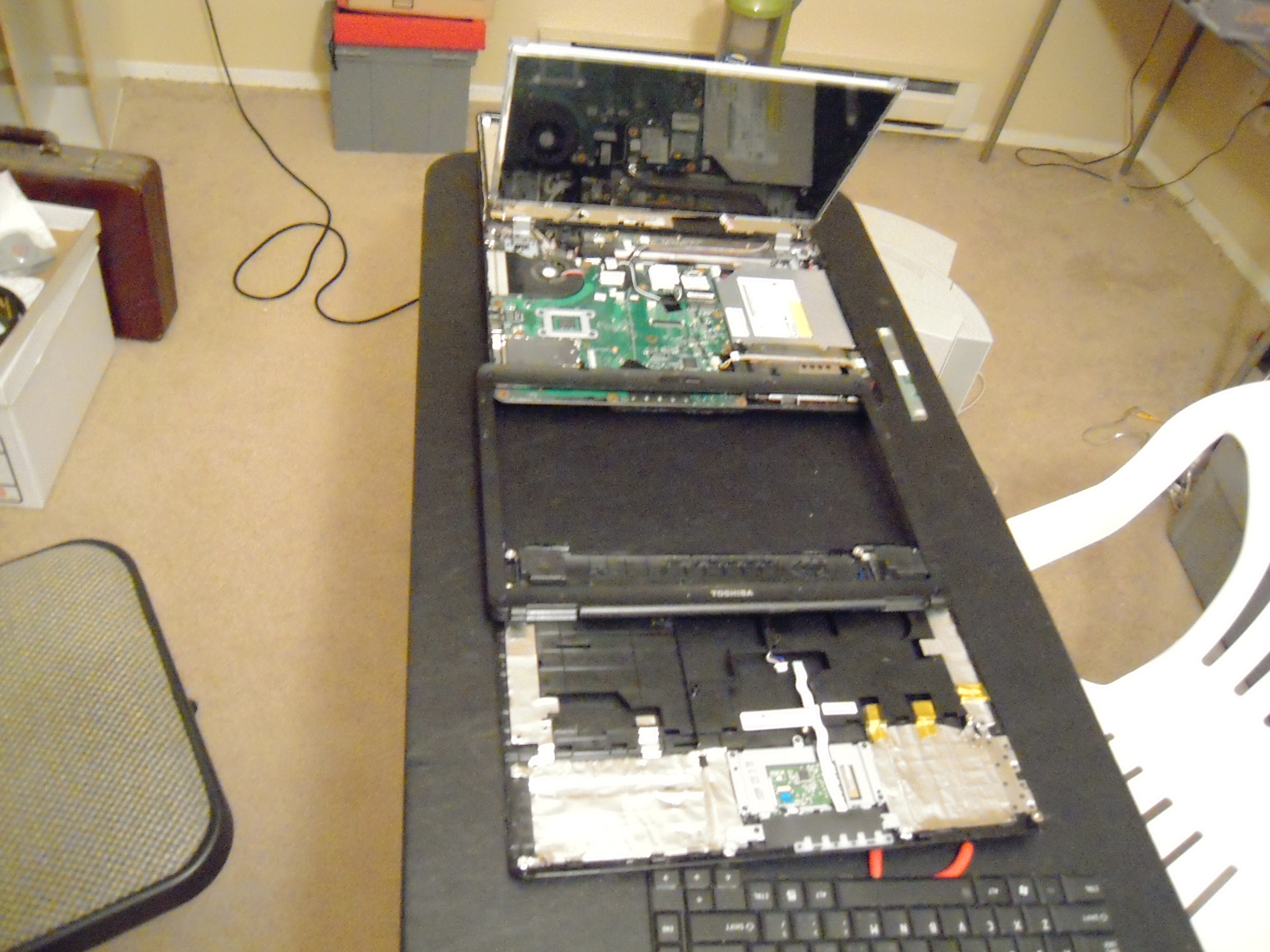
Now you pry off the cover (which doesn’t really doesn’t want to go). Now you can remove the bezel. That’s the plastic rim around the screen, which you would have guessed would have come off on its own, without having to remove the cover of the body of the computer first. But you would have guessed wrong.

Okay, that there’s the inverter. It came from just under the screen. We may have to replace it. It’ll cost $35.

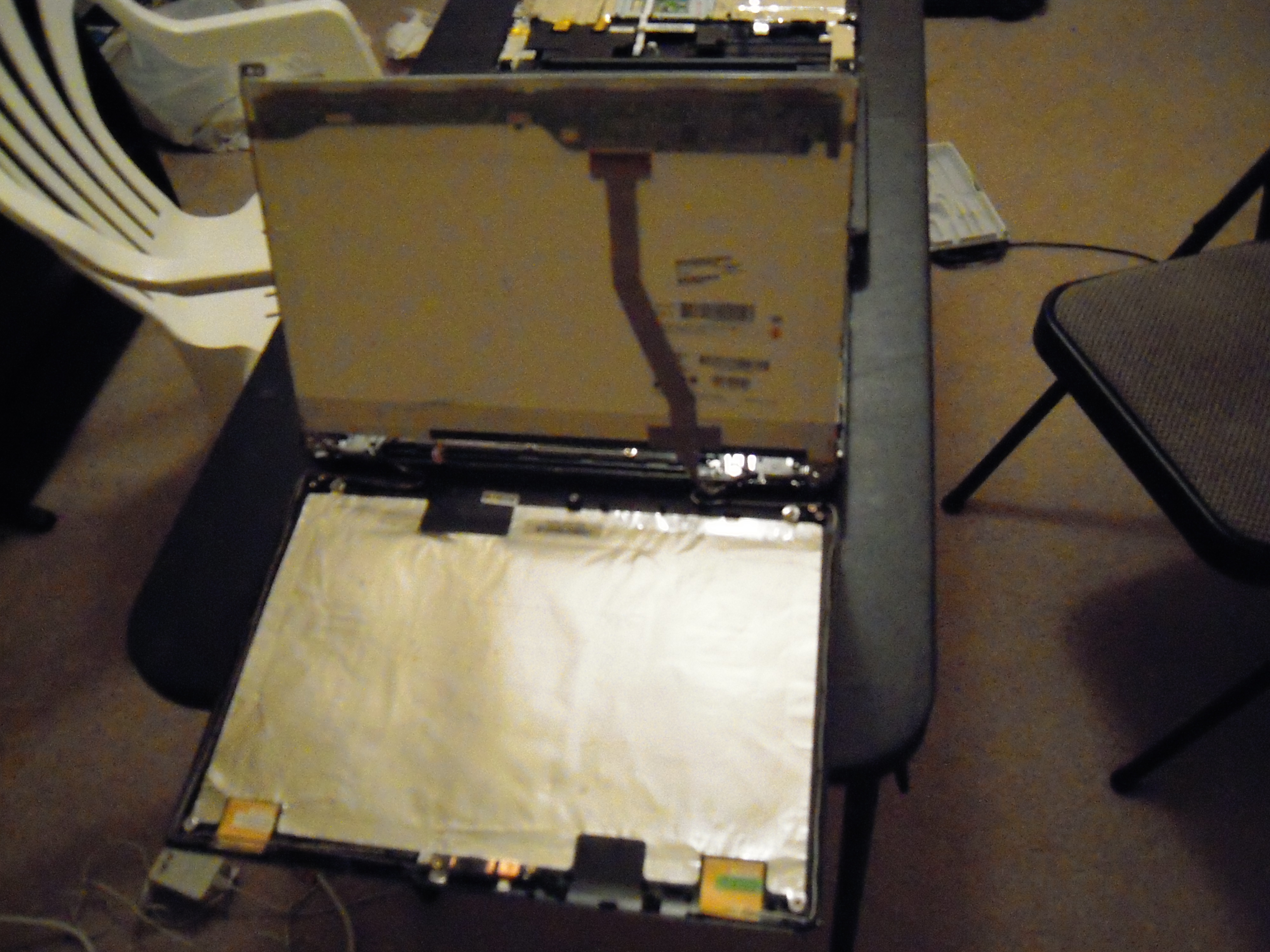
Now, on the other side of the screen, we see the cable that connects the electronics on the top of the screen to the computer body. Wouldn’t the cable be a lot shorter if the screen electronics were at the bottom rather than the top? So why was the screen installed so that its circuit board was at the top, requiring a longer cable to connect to the body? Perhaps there might have been electromagnetic interference problems.

EMI might also explain why the back of the screen enclosure is covered with foil. But I’m only guessing, and I’ve been known to guess wrong.

All right, here’s where the screen cable goes into the computer body. Notice there are a couple points where it could have been crimped and damaged through just normal wear and tear. This confirms my suspicion that the cable is the problem.

BTW, if I had been designing this thing, first of all I would have made it possible to access the screen inverter and cable simply by unscrewing the bezel. And then I would have sheathed the critical cable points with ABS plastic tubing to protect the cable from crimp damage.

I hope the cable costs less than $35 to replace. I figure we’ll price it tomorrow and order a replacement, then do something else while the part is on its way.

To tell you the truth, I look at this mess and wonder if the laptop will ever be the same again. I told my nephew that we may just put it in a box and attach an external keyboard and monitor, and ta-da, a new desktop.

That’ll be Plan B.

Posted in Uncategorized | Tagged , , , , , , | Leave a comment

Pricing a Mining Robot: Communications

So I want to build a teleoperated mining robot to operate over the internet. I provided a graphical overview of the system here. Today my nephew and I priced the communications-link components.

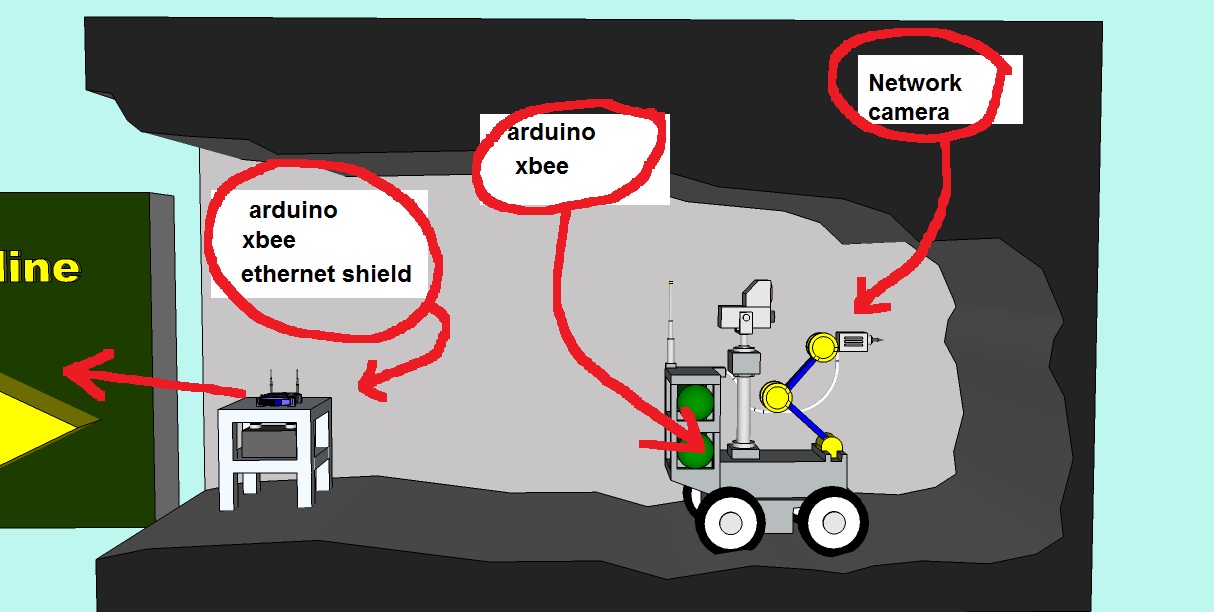
Supposing for the moment that I actually know what I’m talking about, here’s what I figure we need:

Let’s start from left and go right. First, at the entrance to the cave, you have a router that connects to the internet. That’s fifty bucks.

The router connects to an ethernet shield. The ethernet shield enables the router to communicate with an Arduino.

The Arduino in turn connects to an Xbee, which is an Arduino shield that enables the Arduino to send and receive point-to-point radio communications.

On the robot itself is another Xbee shield, which receives and transmits radio signals on behalf of an onboard Arduino. The onboard Arduino in turn interfaces with the wheel motor(s) and manipulators and other systems and sensors of the mining bot.

Altogether you need 1 ethernet shield ($55), 2 Arduinos ($70), and 2 Xbees ($50), for a total cost of $175. Oh, and I forgot that router, didn’t I? Well, that’s $225 then. Tax and shipping and handling not included. (Groan.)

Then there’s the camera, but that turned out to be the easiest and cheapest of all my communications problems. I checked Amazon and found a home security camera that connects over the internet for just $70. I would mention the brand and provide a link, but hey, I’m not getting paid for product endorsements here.

Anyhow, I bought the camera and it’s coming via Super Saver shipping, so it’ll be here next week or so.

In the meantime, it’s back to the neph’s computer. You know, I’m going to have to buy a marker board to keep track of all these projects.

Posted in Uncategorized | Tagged , , , , , , , , | Leave a comment

Laptop of Doom

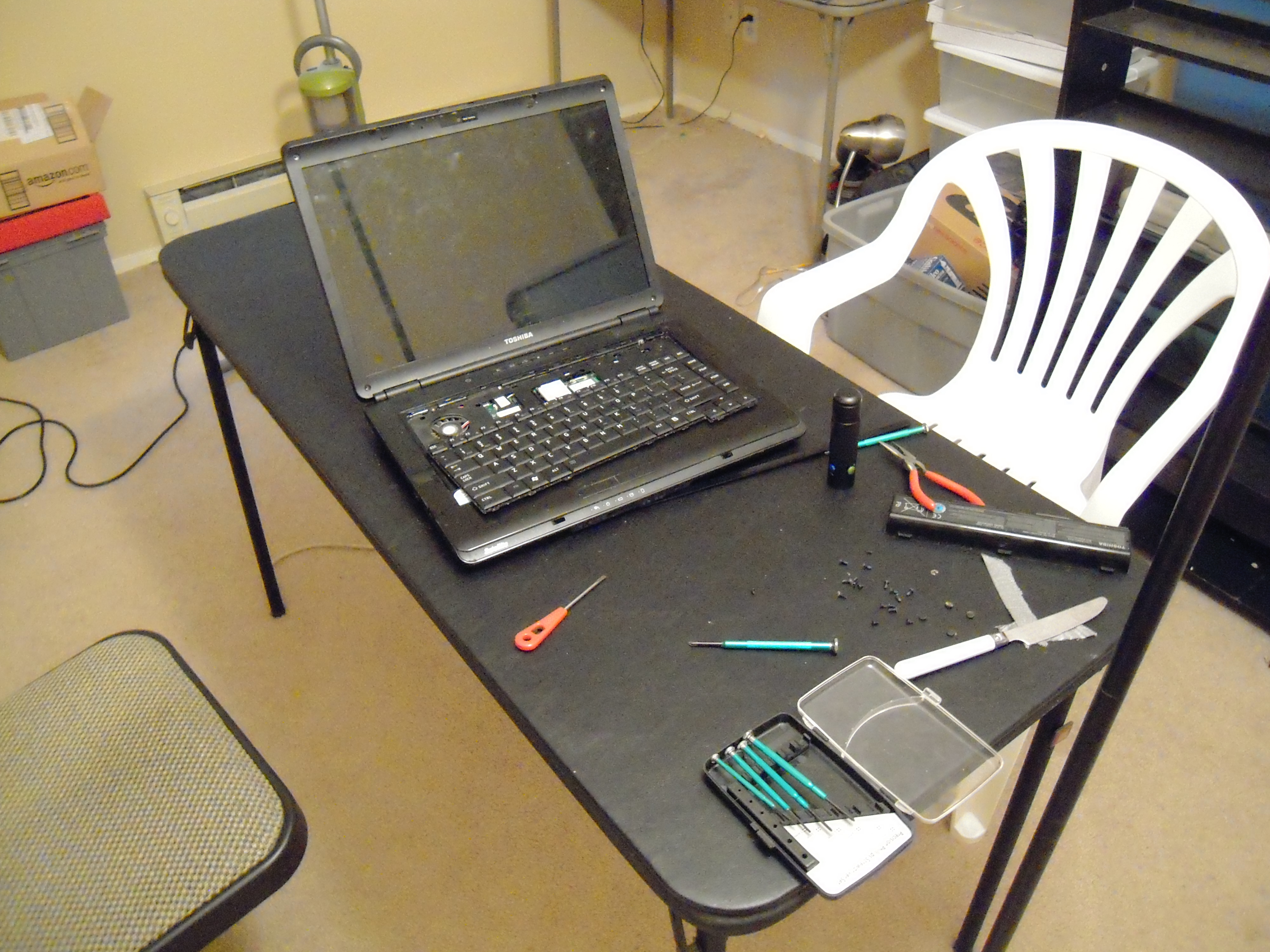
My nephew dropped his Toshiba laptop X number of times, X being a number larger than the number of times that you should drop a laptop. Anyhow, the screen started flickering whenever he tilted it, and then it blacked out entirely. It’s been that way for a while now, and I put off repairing it until I could get the back room cleaned out so that we would have a place to work, like so:

After consulting technical forums, I had determined that the problem had something to do with either (1) the cable connecting the main body of the computer to the monitor, or (2) the screen inverter.

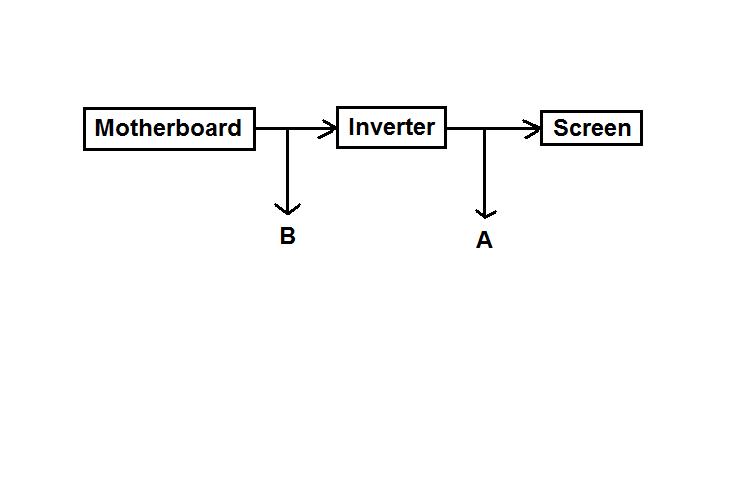
Now, the laptop has a connection for an external monitor, and I had the impression (mistaken, it turns out) that the inverter was ‘upstream’ of where an external monitor connected. See ‘A’ in this diagram:

This gave me the idea (again mistaken) that if I connected an external monitor, I could determine whether the problem was the cable or the inverter, because if the external monitor showed anything, then the inverter had to be okay. Again, this was assuming that the external monitor connects after the signal comes out of the inverter. (Please don’t hit me for thinking that. I know better now, but let’s go on.)

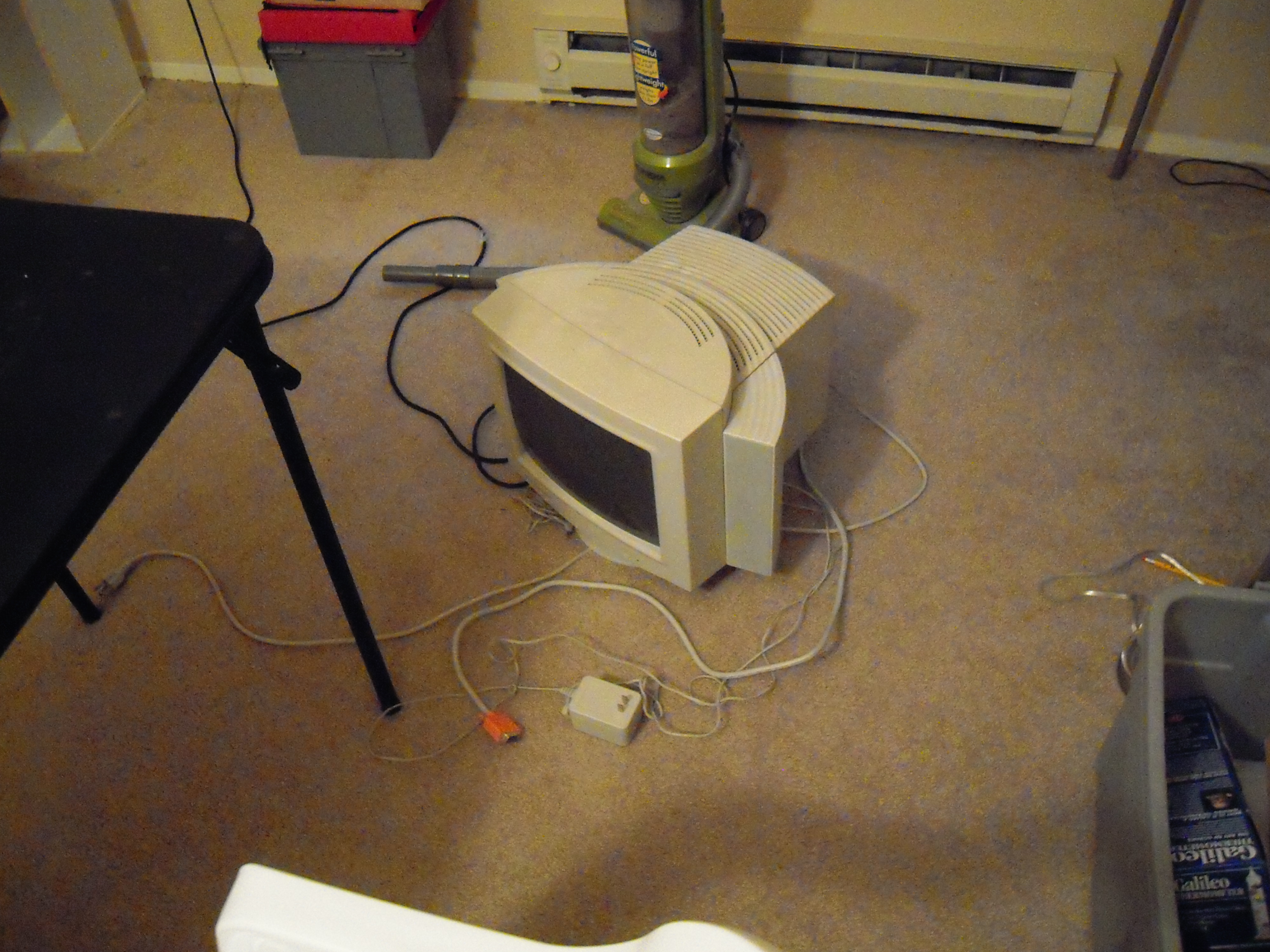
And so it came to pass that I took an old desktop computer monitor from the 1990s and connected it to the laptop’s auxiliary screen port. Here’s what the old monitor looks like:

Notice the bulky speakers with the tangle of cables connected to the sides of the monitor. This is what passed for ‘computer design innovation’ in the 90s.

The result was that the screen image came up on the old monitor, so I concluded (mistakenly — do I have to keep saying that? Yes, I do. It’s my penance.) that the inverter was okay.

After some tinkering, we got the password screen. My nephew typed in his password, and we got the welcome screen. But that’s as far as we got. Now he tells me, “I think my computer may have been zombified.”

Well, that’s something else to think about.

Anyhow, it seemed that the next thing to do was see if the cable was loose, and to do that, I had to unscrew the case. My impression of Toshiba laptop repair is that there are a lot of screws to unscrew. And finally I realized that the top wouldn’t come off even though I had unscrewed everything in sight. So to the Internet, Robin!

I went to irisvista.com and the step-by-step illustrated instructions patiently explained that in order to remove the screen, I first had to remove the keyboard. Why of course!

We finally got the keyboard off, but by then we had run out of time for today. So we’ll go further tomorrow, but I’m not sure how further.

Now, as I mentioned earlier, I had thought that if we got something, anything, on the external monitor, then the problem wouldn’t be the inverter. Then I got the uneasy feeling of self-doubt I always belatedly get when I declare something with great self-assurance, and so I did an internet search to a site called Laptop Parts 101, and from the picture it appears that the external monitor is ‘upstream’ from the inverter. Translation: the external monitor actually taps off at point B in the diagram I showed earlier, and connecting an external monitor doesn’t really tell me if it’s the inverter or the cable that’s at fault.

Well, anyhow, I think we can replace the inverter easiliy enough. But that will cost $35. (Hmm, that’s beginning to be a familiar price point . . . . )

And then what about the ‘zombification’ issue? Well, maybe it’s time to load Linux. My nephew doesn’t like Linux, but I don’t think we have the boot disks for Vista anymore and we’ve got to do what we’ve got to do.

I coming to think that what we’ll end up doing is burying the poor thing and buying a new computer. This time it’ll be a desktop, because I want to upgrade the graphics card. Also, it’s harder to drop a desktop, though to be fair he is seventeen now and seems to be out of the klutzy phase of adolescence.

(Now, if only I could get out of the klutzy phase of middle age . . . . )

Posted in Uncategorized | Leave a comment

Autofade with Fritzing (A review)

From Fritzing.org:

Fritzing is essentially an Electronic Design Automation software with a low entry barrier, suited for the needs of designers and artists. It uses the metaphor of the breadboard, so that it is easy to transfer your hardware sketch to the software. From there it is possible to create PCB layouts for turning it into a robust PCB yourself or by help of a manufacturer.

To give you an idea of what it does, here’s a breadboard of my autofade lamp circuit (click on the image to enlarge and please ignore resistor values at this time):

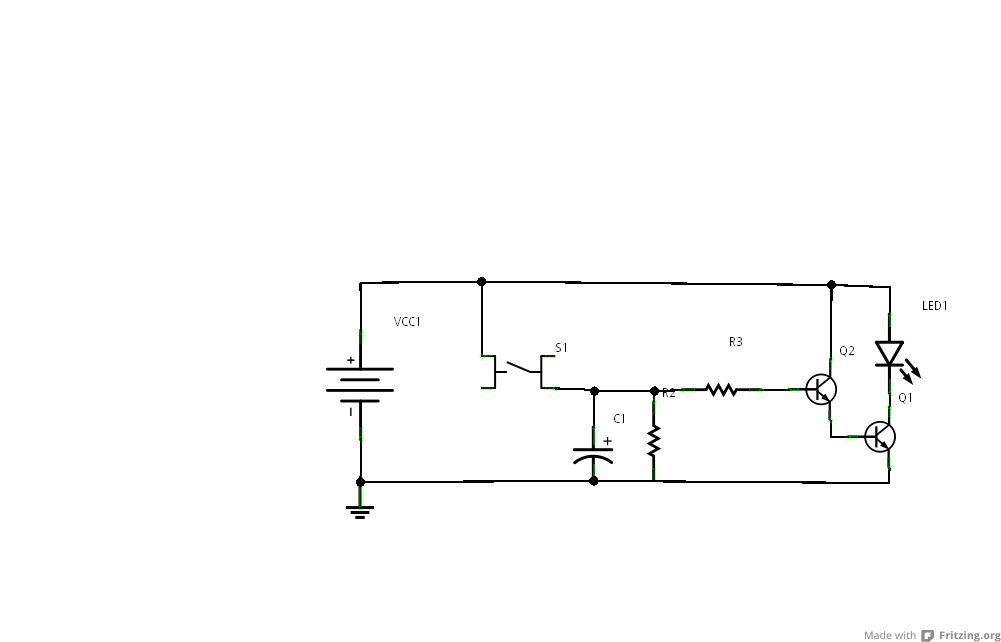
Then here’s the schematic:

And then here’s the PCB layout:

(Well, as you can see, I need to do some more work, but at least we’re getting there.)

Good points:

(1) It’s pretty.

(2) Very intuitive. I was able to do this much within an hour or so, without using the tutorials.

(3) Once you have the PCB ready, you’re only a few clicks away from sending it to a manufacturer and having physical mass production!

Bad points:

I don’t know enough about Fritzing to say anything bad about it. It was easy to download, didn’t crash or glitch. Wish I could say as much about some software that I’ve paid good money for.

I will say that I made a schematic of the circuit, then went to breadboard view, and it was a tangle of wires. Then I tried the breadboard view first, and went to schematic, and again, a tangle. Likewise, the PCB view took some untangling too, which as you can see still isn’t undone.

But I’m expecting too much here. First, the program is free. Second, the program can’t second-guess the user as to the optimal placement of the components and so there’s no way to get out of that work. Third, maybe if I was better at making schematics and circuits, the tangle wouldn’t seem so intimidating. Fourth, I certainly can’t create PCB layouts on my own at this stage of my knowledge, so here the program is enabling me to do something that I can’t do otherwise. Fifth, maybe it would help to go through the tutorials (ya think?).

I should note that I used an LED in the circuit rather than a lamp because I couldn’t find a lamp symbol. You are able to create your own symbols, but I was too lazy to do that yet.

Another thing, if you’re expecting Fritzing to do a circuit simulation, well, it doesn’t. But programs that do circuit analysis have been around for decades, and if it’s not possible already, I expect at some point in the future it will be possible to export a Fritzing schematic into a file format that a dedicated circuit analysis program could load. So I agree with the development team that their focus should not be on circuit analysis/simulation but rather on streamlining the process from breadboard to PCB layout.

All in all, the program is fun to play with and if you’re working with circuits, you should give it a look at Fritzing.org.

Posted in Uncategorized | Tagged , , , , , , , , | 1 Comment

Autofade Lamp Test Circuit Upgrade

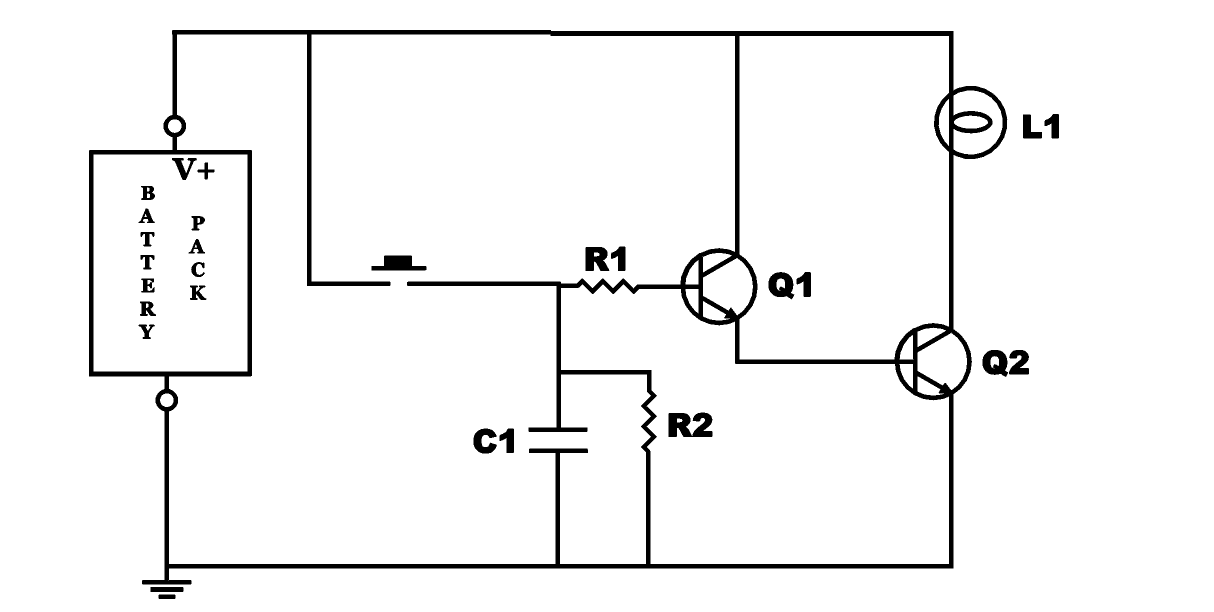
On Saturday, I reported that I didn’t have enough current gain in my autofade lamp test circuit to get a flashlight lamp to glow. The solution was to insert a second transistor, so that the circuit looks like this now:

This is presented in a second video in the autofade lamp series.

Here is the first video in case you missed it:

And here is the second video, about my adventures in upgrading the test circuit:

And so it might be time to start looking at enclosures, reflectors, and diffusers.

Posted in Uncategorized | Tagged , , , , | Leave a comment

Upgrading Autofade Lamp Test Circuit

Well, today was kind of discouraging. Here’s the new autofade lamp test circuit, upgraded:

And here’s the key:

A: I replaced the red LED with a flashlight lamp. The soldering operation was successful and the light is bright enough.

B: I upgraded the capacitor from 1000 microfarads to 3300.

C: The transistor got hot, so I swapped out the 2N3904 to a 2N4401.

And . . . it doesn’t work.

When the LED is swapped back in, the circuit works fine, but there’s not enough base current to amplify the collector current enough to light the lamp. And I do mean that I don’t even see a glimmer.

Where to now? Try a power transistor, try two transistors in piggy-back, try different resistance values. I’m sure there’s a way to make this work, but we’ll probably put it aside for a while because I want to spend some time brainstorming ideas for other future products and how to market them.

Maybe I should draw something in Sketchup. That’s often relaxing.

Posted in Uncategorized | Tagged , | 2 Comments