Grisbot Light Above Two Demo

Here is a demo video of grisbot performing in ‘Light Above Two’ Mode. This could be the basis of a game, in which the object is to steer the robot as close to a marker as possible within a limited number of moves.

Posted in Uncategorized | Tagged , , | Leave a comment

Light Above 2 User Interface

light_above2

This is the Scratch-programmed user interface for the second mode for grisbot to obey commands from a flashlight shined from above.

When a flashlight is shined on the robot with an intensity greater than user-selected value (a), the robot turns:

above1

When the light intensity drops below (a)-100, the robot travels in a straight line and stops at user-selected distance (b):

above2

The user challenge is an exercise in geometry/trigonometry to move the robot toward a target position by a series of turns and moves:

above3

I’ve programmed this procedure in both Scratch and Arduinoese (aka ‘Wiring’) so that it will work on the test bed, but the robot has chosen now to break down. I think that while moving the microcontroller onto the breadboard today, I jiggled the wires so that they are either loose or crossed. So trouble shooting the hardware is where I’m at today.

Posted in Uncategorized | Tagged , | Leave a comment

Grisbug circuit test

Grisbug is like a hexbug, only with programmed features. It is programmed to blink its eyes when a flashlight shines on it. When the flashlight comes closer, grisbug ‘wakes up’ and the eyes glow continuously and the motor runs. When the flashlight is removed, grisbug still glows and makes noise for several seconds before going back to ‘sleep.’

(NOTE: In the video, it appears that on of the LED ‘eyes’ isn’t working. It is, but it’s very dim.)

What’s next: fitting it into a smaller, lighter enclosure. Then I’ll think about adding user programmability.

Posted in Uncategorized | Tagged , | Leave a comment

Mice Eating Watermelon!

DSCN3013

DSCN3014

Sammy and Sam Sam eating watermelon. Engineer bloggers are allowed to be off topic if it’s Sunday and if it’s cute.

Posted in Uncategorized | Tagged , , | Leave a comment

grisbug instamorph

On Friday morning the bathroom sink plugged up and while looking in the cabinet underneath for the snake, I spied a siphon clip that I had made with instamorph. How fortuitous! I had completely forgotten — Instamorph, of course! Just what I needed for making the grisbug enclosure. (Well, perhaps.)

In case you’re not familiar with this stuff, it’s a plastic-like material that melts at 140 degrees F, can be molded into a desired shape, then hardens as it cools. And I thought it would make an excellent enclosure for grisbug, since being formed by hand it tends to end up in organic-looking shapes anyway.

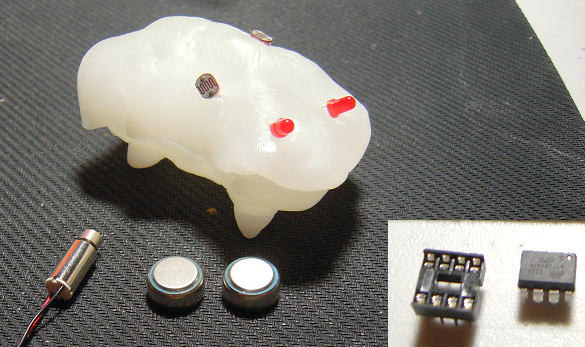
I carefully weighed out an ounce (about $1 in bulk price), heated up a sauce pan of water, poured in the instamorph pellets for warming, and molded a mock-up like so:

grisbug instamorph

I’ve laid out all the components here to show that there’s more than enough room inside to accommodate them. Indeed, I might be able to squeeze in a mini breadboard. I also have a free pin on the ATTiny, so that I could add another LED for internal color.

Posted in Uncategorized | Tagged , , | Leave a comment

Grisbug: first concept

grisbug2

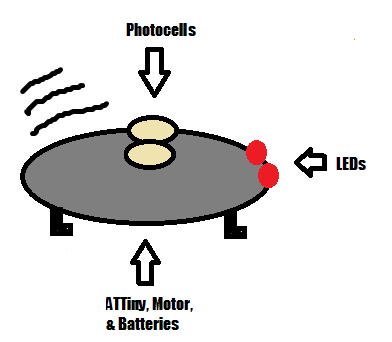
I’m sure everyone is familiar with hexbugs, which are selling for about $6. Well, I’m working on a design for a ‘grisbug’ which will aim for roughly the same price point but have expanded capabilities.

I priced the ATTiny at $1 (in bulk), the 2 LEDs at $.30, the two photocells at $.64, and the motor at $2.50, for a total of (check my math) $4.44. After checking Ebay, I found that button vibration motors are going for $1, which would bring the price down below $3.

Of course we’re assuming a kit, and that the casing cost is negligible. But it looks like I can match the price point of a hexbot — and make something that lights up and is programmable.

As you might guess from the dual photocells, grisbug would be programmable by holding it up to a computer screen and flashing commands. As to what to program, I was thinking that the user could program things like the light level at which the eyes blink on, then also the light level at which the motor runs. And maybe the motor could be programmed to beat out a tune, too!

In another mode, it might be possible to program the bug so that if light levels change abruptly, it reacts by flashing its eyes in warning, then buzzing. This might form the basis of a game in which the user tries to snatch an object away from the bug without moving too fast or too slow while a randomized time limit ticks down.

Well, at this point, I’m not even sure that an ATTiny will accept screen-flash programs. But if so, then grisbug could be an entry level product for young roboteers, with grisbot as its older brother.

Posted in Uncategorized | Tagged , | Leave a comment

ATTiny Photocell/PWM demo

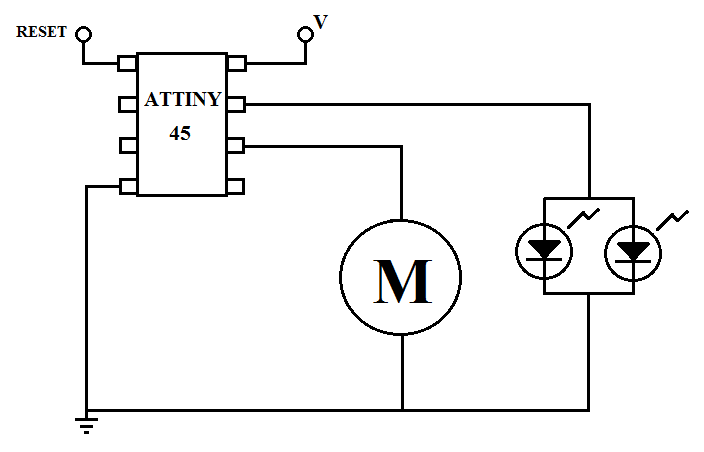
I wrote a little program and made a circuit for the ATTiny which enables a photocell to control an LED and a motor with pulse width modulation.

Here’s the video:


And here’s the circuit diagram:

photo pwm

And here’s the code for the Arduino IDE:

int val = 0;
int qval = 0;

void setup(){
  pinMode(1,OUTPUT);
  digitalWrite(1,LOW);
  
  pinMode(0,OUTPUT);
  digitalWrite(0,LOW);  
}

void loop(){
  val = analogRead(1);
  qval = int(val/4);
  if (val<200){
    qval = 0;
  }
  analogWrite(1,qval);
  analogWrite(0,qval);
}

The LED doesn’t seem to ‘fade’ on. Rather, it seems to come on suddenly.

Posted in Uncategorized | Tagged , , , , | Leave a comment

ATTiny 45/85 Pin Conventions for Arduino IDE Sketches

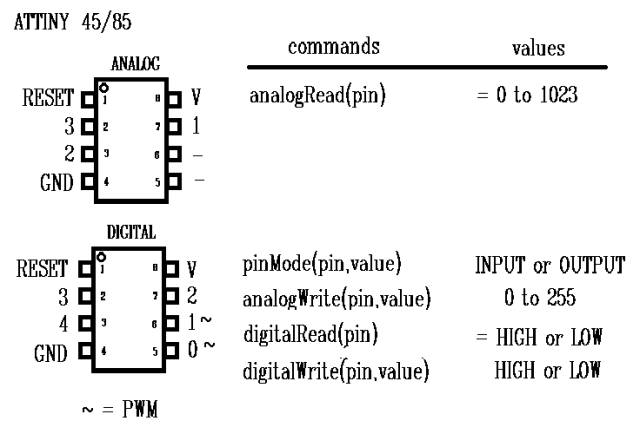
The main source for information on how to program the ATTiny using the Arduino IDE is found at the MIT High-Low Tech site. But I found the information on the pinouts rather opaque for the newbie (= me), so as an aid to myself I made the following chart for the ATTiny 45 and 85 (which are the eight-pin versions):
attiny pinouts

Inside the above chip illustrations are the physical pin numbers, running counter clockwise 1 through 8 starting from the little circle which appears on the chip casing. You would use these numbers as reference for physically connecting the ATTiny to a circuit, but they are irrelevant to the Arduino IDE.

As for detailed information on how the various pin functions work, I recommend visiting the Arduino Language Reference page. But here I’ll summarize some of the peculiarities of the ATTiny regarding the usage of said functions.

Unlike the ATMega328 chip, the ATTiny needs only one pin connected to the voltage source and only one pin to ground. The reset pin will restart your program when it is connected to ground and then released. The reset pin can also be reprogrammed as an IO pin, but that’s outside the scope of this discussion.

In Adruino IDE software, the ATTiny pins can do double duty as either analog or digital. As you can see, they have different numbering conventions depending on whether you are using analog or digital functions. This is confusing but it does allow for flexibility.

To use a pin as an analog input, you simply use the analogRead() function, referencing the respective analog pin number.

To use a pin in digital mode, you must first use the pinMode() function, referencing the digital pin number and specifying whether you want to use INPUT or OUTPUT mode. Then you can use the other digital pin functions.

(As you may have noticed, you didn’t need to specify pinMode() when using analogRead(). When a pin can be used as either analog or digital, analog is the default.)

You may wonder why analogWrite() is down on the lower table with the digital pin functions. It’s because analogWrite() isn’t really an analog pin function, instead it’s used for pulse width modulation of the digital output signal. Thus you use it with the digital pin numbering convention. As the tilde mark (the ‘~’) indicates, only the two pins in the lower right are PWM capable. As it happens, these pins don’t have an analogRead() capability. Perhaps some sort of internal circuitry tradeoff is involved with that. Interesting.

I’m new to the ATTiny, so I wouldn’t be surprised if there are errors. Corrections are appreciated and the chart will be updated accordingly. I realize that there is stuff that I’m omitting, like what is SCK or MISO or MOSI, but I figure I have to start somewhere.


(NOTE: The ATTiny45/85 chip prices offered on Amazon are reasonable if you’re in a hurry or just want one or two. Otherwise it’s recommended that you shop around.)

ATMEL – ATTINY45-20PU – IC, 8BIT MCU, AVR Tiny, 20MHZ, 8-PDIP

ATMEL – ATTINY85-20PU – IC, 8BIT MCU, AVR Tiny, 20MHZ, 8-PDIP

Posted in Uncategorized | Tagged , , , , | 4 Comments

Thirty Year Old Predictions

new technology book

From the cover:

“Robotics. Today, they build Fords and Toyotas; tomorrow they’ll vacuum your floors.”

“Cable TV. Soon your set will bring hundreds of channels into your home. And you’ll talk back!”

“Computers. Football or horse racing, politics or Wall Street, your portable home computer will give you the edge.”

“Newspapers. They’ll be as obsolete as the horse and buggy, when your hand-held ‘newsfax’ machine brings you up-to-the-minute news and in-depth reports.”

“Telephones. AT&T is just a step away from plugging you into a vast space-age communications network.”

“Satellites. Satellite-supplied weather information will soon be almost 100% reliable — anywhere, anytime.”

“Lasers. Precise enough to focus on a single human cell, powerful enough to blow fist-sized holes in battlefield tanks.”

“Radiation. From microwave ovens to electric blankets, it’s everywhere — and we’re all in a game of radiation-roulette.”

I could make a thousand comments here, but it’s time to get back to work. All I will say is, that thirty years sure went fast, and I suppose the next thirty will go faster still.

Posted in Uncategorized | Tagged , , | Leave a comment

Palpatine Pez Project (Incomplete)

palpy pez

This was an idea I had for Adafruit’s Six Second Video Challenge. I wanted to ‘upgrade’ a Pez dispenser to flash eyes and play music. Given how creepy red glowing eyes are, what better choice than an Emperor Palpatine Pez dispenser?

So imagine that you use such a modified dispenser. What could possibly go wrong? Well, here’s the prototype in action:

Unfortunately, the Adafruit contest doesn’t allow licensed products and yes, I know, hard to believe, Emperor Palpatine is a licensed product.

Thus having gotten around to reading the contest instructions midway through the project, I decided not to go to the additional effort of making an enclosure with hinge switch, using hearing aid batteries instead of AA batteries, and so on. And of course, there are improvements that could have been made as well, for example having the motor vibrate with a pulse width modulation signal to provide true notes rather than just beats.

The microcontroller in question is an ATTINY45V. Here is the schematic:

palpy pez schematic

Electronic candy dispensers are the future and the Pez company should contact me as a consultant. As it turns out, I have free time just now.

Posted in Uncategorized | Tagged , , | Leave a comment