
Blogroll
-
Recent Posts
Archives
- July 2025
- March 2025
- February 2025
- January 2025
- December 2024
- July 2023
- March 2023
- February 2023
- November 2022
- September 2022
- August 2022
- April 2021
- July 2018
- June 2018
- May 2018
- December 2017
- September 2017
- August 2017
- February 2017
- June 2016
- May 2015
- April 2015
- March 2015
- December 2014
- October 2014
- September 2014
- June 2014
- May 2014
- April 2014
- March 2014
- February 2014
- January 2014
- December 2013
- November 2013
- October 2013
- September 2013
- August 2013
- July 2013
- June 2013
- May 2013
- April 2013
- March 2013
- February 2013
- January 2013
- December 2012
- November 2012
- October 2012
- August 2012
- July 2012
- June 2012
- May 2012
- April 2012
- March 2012
- February 2012
- January 2012
- December 2011
- November 2011
- October 2011
- September 2011
- August 2011
- April 2011
- March 2011
- February 2011
- January 2011
- December 2010
- November 2010
- October 2010
- September 2010
- August 2010
- July 2010
- June 2010
Meta
Grisbot Udrive
I’ve been encountering problems with implementing a hand-wave programming mode for grisbot, but along the way I came up with the following idea: how about a mode where the user holds the robot up to the screen and programs the servo timing directly.
I call it ‘Udrive,’ because the programming mode screen has a big U on it. Here it is with the grisbot testbed:

Here’s how it works.
If you hold the robot so that both photocells are in the dark area in the middle of the U, nothing happens.
If you move the robot to the left so that the left photo cell is in the light area on the left, the left LED lights up.
If you move the robot to the right so that the right photo cell is in the light area on the right, the right LED lights up.
If you move the robot so that both photocells are in the light area on the bottom, both LEDs light up.
If you (NOW) hold the robot so that both photocells are in the middle dark area for more than three seconds, the LEDs will blink to signal the end of program mode. Five seconds later, they will blink again, and that will begin action mode.
The LEDs will then repeat the same pattern of coming on and off with the same timing that the user inputted.
Of course, this isn’t about LEDs. When the program passes the testbed test phase and is moved onto the robot test phase, the servos will follow the same timing as the LEDs.
If this doesn’t make sense now, I should have the testing finished and the video up in a day or two and then you’ll be able to see it’s pretty straightforward.
Left and Right Blink Proximity Demo
Moore’s Law has been trumped, in that I have doubled the resolution of blink proximity in a single week. So what, you ask? Well, it means that the robot can now turn toward or away from obstacles. Or, even more esoterically, I can program the robot with hand gestures. And that’s what I’m really going for.
Here’s the test rig:
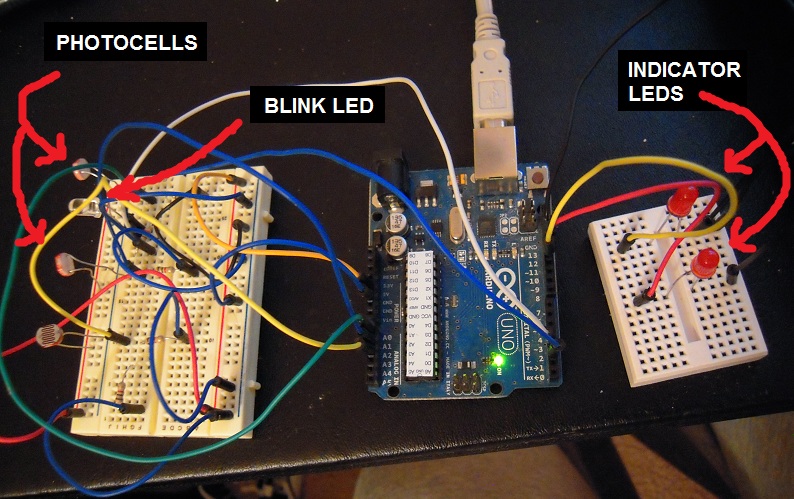
And here’s the demo:
If I had a 3D printer (Part 2) . . .
. . . I could make stuff like this:
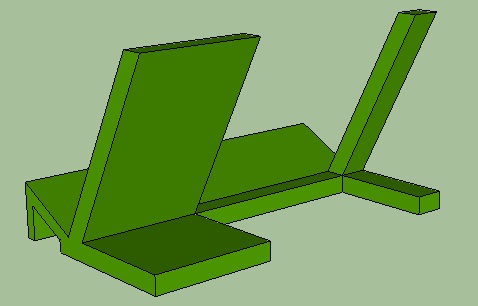
Give up? It’s a camera cradle, for taking photos and video from an elevated angle without having to buy and break out a tripod:

Of course, you have to elevate it above the scene by placing it on a table or shelf or stack of books. Presumably you won’t need your 3D printer for that!
Next, there’s this keychain ounce scale:

The side of the fob to the right of the chain is scientifically engineered to weigh one ounce more than the side to the left. Thus if you clip a bag to the left hand side and it (the bag) weighs less than an ounce, it (the keychain fob) will tilt accordingly:
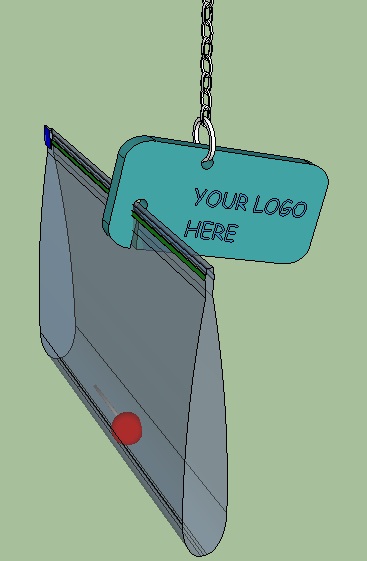
Parents in Washington State, your kids may find this handy to stay out of trouble. And moving right along . . . .
Have you ever studied from a thick textbook while trying to do something with your hands, say like type at a computer or slurp soup, only to discover that the mischievous pages have minds of their own? Then you need these:

And what are those? Why, they are ‘page anchors’ designed to facilitate the hands-free reading experience:

Now you can type and slurp at the same time and never lose your place.
Well, this seems to be a ‘weighty’ blog entry, because the final item is a ’tissue box base’ filled with pennies to weigh it down:
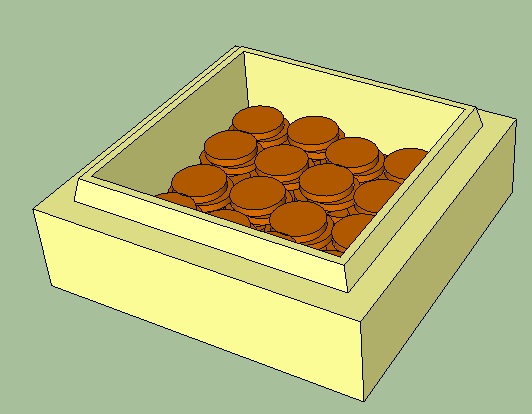
And the reason you weigh it down is so that you can pick one tissue from the box without the whole box lifting off the table:

Now you can type or slurp with one hand while getting a tissue with the other. We live in an age of wonders.
(But perhaps you’re wondering what keeps the box from separating from the base? I don’t have a ready answer. A very snug fit indeed, I would guess, or a rubber band around the bottom of the box to serve as a shim. Hmm.)
Once again, I don’t have a 3D printer, and I don’t have the files to make these things either. But if you want to make the files and print the objects yourself, go right ahead.
Solving Logic Puzzles With Sketchup
Perhaps you’re familiar with those logic puzzles where five people live next to each other and have different traits, and you’re given seemingly unrelated clues and asked to figure who has what.
You know, logic puzzles like this one:
Well, you can solve these puzzles with Sketchup.
First, you make a table for the data:
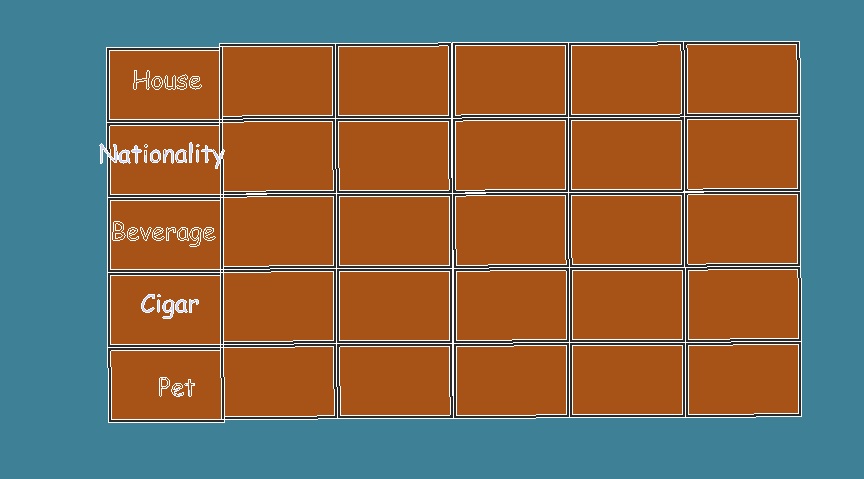
Next, you link the clues into groups:

Then you fit the clue-groups into the table slots like so many puzzle pieces:
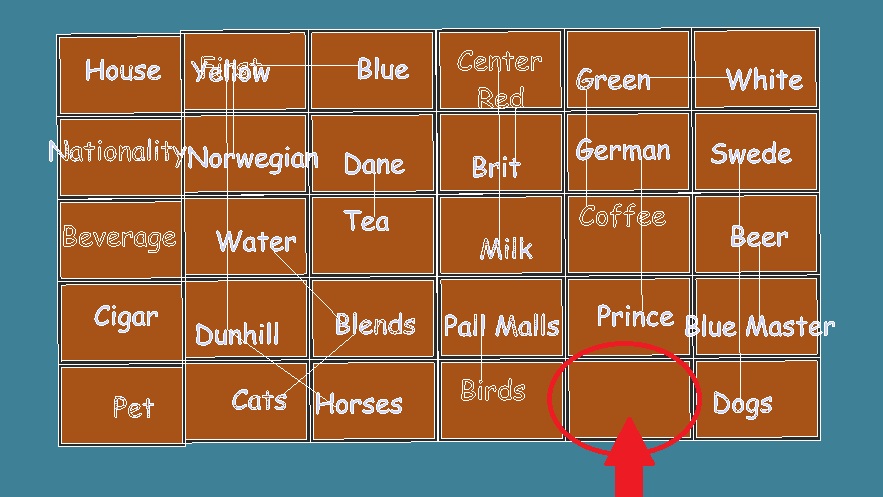
And there you go! (ie, the German has the fish. Yes, I just spoiled this one for you. But there’s thousands of these puzzles out there, and now you have the analytical tool to easily solve them all!)
This probably doesn’t have real world application, but I thought it was intriguing that a 3D drawing program could be used for solving logic puzzles.
Blink proximity detection
This detector works by flashing an LED and comparing photocell readings with LED off and on to subtract ambient light and determine if there is an object in front of the robot which the LED light is reflecting from.
Since I already have photocells on my robot, all I have to do is add a high brightness LED. The one in the video cost about $1.25 at Radio Shack.
Anyhow, if you put your hand in front of the robot, it will now stop. Alternatively, guide posts could send it off in another direction. I can think of lots of ideas here, but what would be interactive and fun?
If I had a 3D printer . . . .
. . . I’d print me some of these:
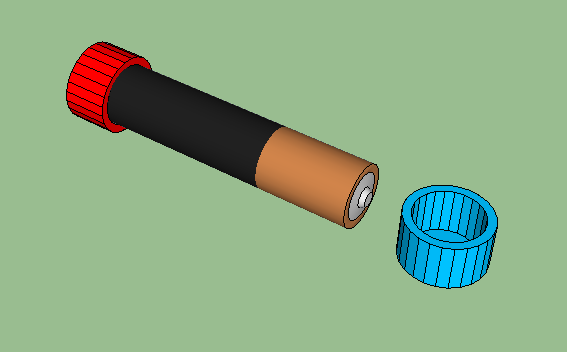
Reason: I go for walks with my MP3 player, and when the battery dies midway, I have to swap out a new battery. But carrying a battery in a pocket is a dicey proposition, because I might forget and put coins and other metal objects in the same pocket. I’ve learned the hard way that can make a short circuit, which can get quite hot!
Hence, plastic battery caps. The code for the positive (top) end is ‘blue for new’ and ‘red for dead.’
And now for something completely different:
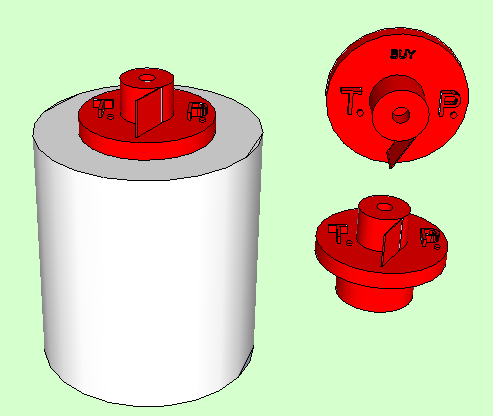
I call it a ‘toilet paper kanban.’ It sits on top of the last roll of toilet paper in the bathroom cabinet. When you take the last roll, you take the tp kanban out of the hole and put it where it will remind you to buy more toilet paper. Since it would have to be made in two pieces and glued together, perhaps a magnet could go inside so that it could stick on the refrigerator. Or . . . maybe somewhere else.
And finally, there’s this nifty pc camera lens cover:
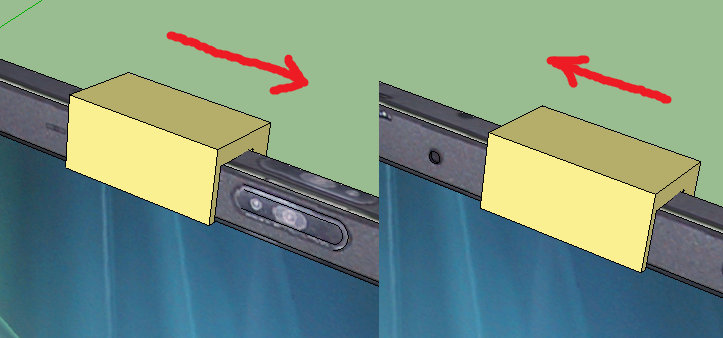
Because people can watch you while you think your camera is turned off. Yes, there are people who would do that. Over the Internet. I know. They must be really bored.
Well, these are just some of the ideas I’ve had for 3D printed products. Maybe I’ll buy a 3D printer, then learn how to convert these drawings into print files, and then I’ll make the print files available to you. And then I can be even more broke than I am now, but at least I will have contributed in some small way to the general progress of humanity.
The Computer Inside You
When I was a kid back in the 1960s, I mentioned to some other kids on the school bus that I had read a science-speculation article about being able to integrate computers with the human brain. I thought it was a pretty cool idea, but they said, “You want to turn people into machines!”
I learned to keep quiet about the idea. But still, it’s happening.
Once upon a time, computers were ‘big iron’ machines hidden away in government and corporate labyrinths. Then they emerged from their caverns and took residence upon our desks. Then they became portable laptops able to accompany us out of the office to home and on vacation. Then computers became tablets and smart phones, carried everywhere all the time in our pockets. Now they’ve climbed up to eye-level in the form of ‘Google Glasses,’ which will provide an augmented reality experience for the user.
You see where the computers are heading: getting closer and closer to our brains, until they jump inside.
Does this mean thought control? I doubt a brain-computer interface would be able to read thoughts. Human thoughts involve complex choreographies of billions of neurons firing at once. You would need one sensor for every neuron just to collect the data, never mind interpeting it.
However, it would be much easier to create an interface to enable the user to consciously input commands into the computer at a speed comparable to or in excess of speech. That in itself would require interfacing with only a few thousand neurons.
Far more neurons would have to be interfaced to provide full audio and video streaming going from computer to brain. Rapidly implanting a multitude of microscopic electrodes is beyond human surgical skill, but we can well imagine that robosurgeons might be able to implant millions through the tiniest of incisions within just minutes.
If the Terminator and Robocop movies offer any guideposts for the future, the patient then boots the system and finds a Windows/Mac/Linux-type GUI overlaying the normal field of vision. Willpower alone moves the mouse over the dropdown menu items. Need to know the time, figure how much to tip, or send a sub-vocalized message to Significant Other while your boss thinks you’re listening attentively? There’s an app for that.
Full immersion virtual reality would empower you to enter virtual worlds at will. With microelectrodes stimulating the proper neural pathways, everything you see and hear and feel could be fully immersed – no need to build a holodeck, because it’s already in your head. Online gaming and social media will be redefined out of all recognition.
Additionally, the computer inside you will take advantage of its placement to do a few things that smartphone apps can’t, like continually monitor body status, reporting on everything from heart rate to blood sugar. It can even fix a few things. Break your leg skiing? Turn down the pain. Trouble sleeping? Be knocked unconscious or kept wide awake. Neighbors too loud? Take your ears off line.
So were the kids on the bus right, and are we to become more machine-like? Well, that was a bad thing when robots were clunky and graceless. But generations of Moore’s Law later, ‘machine-like’ means transcending biological limits, becoming less clunky and more graceful. Might that be a good thing?
But with brain implants in place, will Big Brother be able to monitor every word and action? Well, it can do so now with present-day surveillance equipment. Surveillance is more about politics than technology. Contrawise, once individual human consciousness expands (say) a thousand-fold, can central authority even hope to keep up?
Ultimately, let us ponder that brain-computer interfaces are perhaps the only hope for humanity in the shadow of the machine. Consider, for example, how Captain Picard was always asking Commander Data for calculations, like how long it would take to reach the Neutral Zone at Warp Nine. That meekly-tendered request was always a tacit admission that androids are infinitely smarter than humans, and in his response Data always endeavored not to sound too smug.
In a more plausible future, however, Picard’s implants would inform him instantly and perhaps it would be Data who, with a non-upgradable operating system decades out of date, would end up ‘feeling’ useless and maybe just a little intimidated by what has become of human potential.
At any rate, to give another example, this one from real life: the other day I was standing in line at the gas station counter and with mounting frustration I was searching in my wallet for my discount card.
My turn came and I mumbled to the clerk, “I can’t find the card.”
She quietly replied, “It’s in your hand.”
I had taken it out a moment before, gotten distracted while waiting, and forgotten I was holding it in my other hand.
So for me, a brain-computer interface that can enhance human intelligence, perception, and memory is nothing to fear. On the contrary, it can’t happen soon enough.
Schematic Diagrams in Sketchup
Paint and Sketchup are the only drawing programs that I know how to use. Paint has become miserable with Windows 7, so that it is almost impossible to draw a straight line, let alone a schematic diagram. So I thought that as an experiment, I would make some freehand electronics symbols in Sketchup, which could then be assembled into schematic diagrams and then copy and pasted into Paint for the captions.
For the sake of comparison, here again is how it looked when I drew the RGB Timer circuit yesterday in Paint:

And without further ado, here is the schematic result for the RGB Timer circuit in Sketchup:

I would say it’s an almost professional improvement. Moreover, once I make some more components in the template file it will be easy to draw any circuit in Sketchup and zoom in and zoom out as desired.
 Engineer Zero